What is Active Directory?
- Active Directory is a directory service developed by Microsoft for Windows domain networks.
- It runs on windows Server and enables administrator to manage permission and access to network resources.
- It stores information about users, computers, and other resources, and helps administrators manage these resources.
- Think about it as a phone book for Windows
- Authenticates using Kerberos tickets.

Active Directory Domain Service(AD DS) :
- The main service within Active directory is Domain Service (AD DS), which stores directory information and handles the interaction of user with the domain.
- AD DS verifies access when a user signs into a device or attempts to connect to a server over a network.
- AD DS controls which user have access to each resource, as well as group policies.
An administrator typically has a different level of access to data than an end user.
- Though the main service is AD DS, but it also includes :
-
Lightweight Directory Service(AD LDS) :
- A mini version of AD DS
- Used when you don’t need full domain features like user logins
- Often used by applications that just need a place to store and look up user or app info
- Example:
- An app that needs its own directory to manage customer profiles, not tied to Windows login.
-
Lightweight Directory Access Protocol(AD LDAP) :
- Protocol (or set of rules) used to communicate with AD
- Lets apps or services search and read data in Active Directory
- Example :
- A login page that uses LDAP to check your username and password against AD.
-
Certificate Services(AD CS) :
- Creates and manages digital certificates
- Used for encryption, secure websites, VPNs, and smart card login
- Example:
- When you go to
https://example.com, AD CS can issue the SSL certificate to secure the connection.
- When you go to
-
Federation Services(AD FS) :
- Lets users log in once and access systems across different networks or companies
- Used for Single Sign-On (SSO)
- Example:
- You log in to your work account, and then you can access Microsoft 365 without logging in again.
-
Rights Management Services (AD RMS) :
- Protects sensitive documents or emails
- Controls who can open, copy, print, or forward a file — even outside the company
- Example:
- A confidential PDF that can only be opened by your boss and can’t be forwarded or printed.
-
"Non-Windows devices, such as Linux machines, firewalls, etc. can also authenticate to Active Directory via RADIUS or LDAP."
Even though Active Directory (AD) is made by Microsoft mainly for Windows devices, other devices that don’t run Windows — like:
- Linux machines
- Firewalls
- Routers
- VPNs
— can still use AD to check usernames and passwords, by using special protocols like:
Protocols Involved:
| Protocol | Full Form | What It Does |
|---|---|---|
| LDAP | Lightweight Directory Access Protocol | Lets non-Windows systems talk to AD to read user information or authenticate users. |
| RADIUS | Remote Authentication Dial-In User Service | Used by network devices (like firewalls, VPNs) to verify usernames/passwords using AD. |
Functions of Active Directory
- Authentication: Verifies user credentials (username/password).
- Authorization: Grants access to resources based on permissions.
- Centralized Management: Manages users, groups, and policies from one place.
- Group Policy: Applies specific configurations and security settings to users/computers.
Why Use Active Directory?
Active Directory is the most commonly used identity management service in the world.
(95% of Fortune 1000 companies implement the service in their networks)
- Centralized control and security.
- Simplifies user and resource management.
- Scalable for enterprise environments.
- Supports automation and compliance.
- Can be exploited without ever attacking patchable exploits.
- Instead, we abuse features, trusts, components, and more.
"Can be exploited without ever attacking patchable exploits. Instead, we abuse features, trusts, components, and more."
Sometimes, hackers don’t need to find a software bug or vulnerability (which would normally be patched by updates).
Instead, they can misuse existing, built-in features or legitimate system configurations that:
- Were designed to make things easier or more efficient
- But can be abused for malicious purposes
Key Terms Explained:
| Term | What it Means |
|---|---|
| Patchable Exploits | Bugs or flaws in software that can be fixed (patched) with updates |
| Abuse Features | Using built-in tools (like PowerShell, Group Policies) for attacks |
| Trusts | Relationships between systems/domains that allow automatic access |
| Components | Legit parts of the system (like Active Directory features) |
Example in Context (Active Directory)
- Kerberos Delegation is a legit AD feature used to allow services to act on behalf of users.
- An attacker can abuse it to impersonate users and access sensitive data — without any bug.
Another example:
- Pass-the-Hash: Instead of cracking your password, an attacker uses your hashed password (already stored in memory) to log in — using no vulnerability.
Bottom Line:
Not all attacks need a “hole” in the system —
Sometimes, the system’s design itself (if not secured properly) can be used against you.
Common AD Terms
| Term | Meaning |
|---|---|
| LDAP | Protocol used to access and maintain AD data. |
| Kerberos | Default protocol for authentication in AD. |
| GPO (Group Policy Object) | Rules applied to users/computers in AD. |
Example to understand Active Directory
Imagine a School
Let’s say there’s a school with many:
- Teachers
- Students
- Computers
- Shared Files (like assignments, timetables)
School Office = Active Directory
The School Office keeps a record of:
- Who the teachers and students are
- Which classes they belong to
- Which computers they use
- Who can access what files (e.g., teachers can see marksheets, students can't)
This office also:
- Checks ID cards when someone enters (like login authentication)
- Tells who can go where (like authorization)
- Sets rules, like computer lab rules for all students (like Group Policies)
Example in AD Terms
| School Example | Active Directory Equivalent |
|---|---|
| Student/Teacher | User account |
| Class group | Organizational Unit (OU) or Group |
| School Office | Domain Controller |
| ID check at entrance | Authentication |
| Permission to access lab | Authorization / Group Policy |
| Central record system | Active Directory Database |
So, just like the school office controls everything centrally, Active Directory helps companies manage users and computers in one place, securely and efficiently.
Active Directory Structure
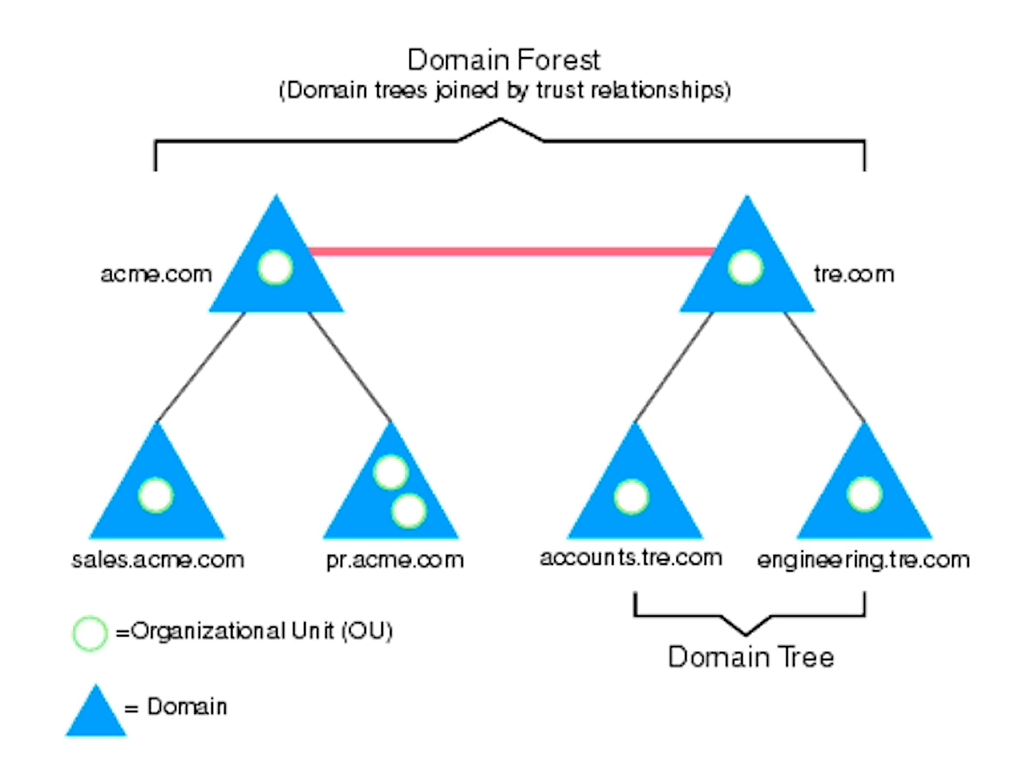
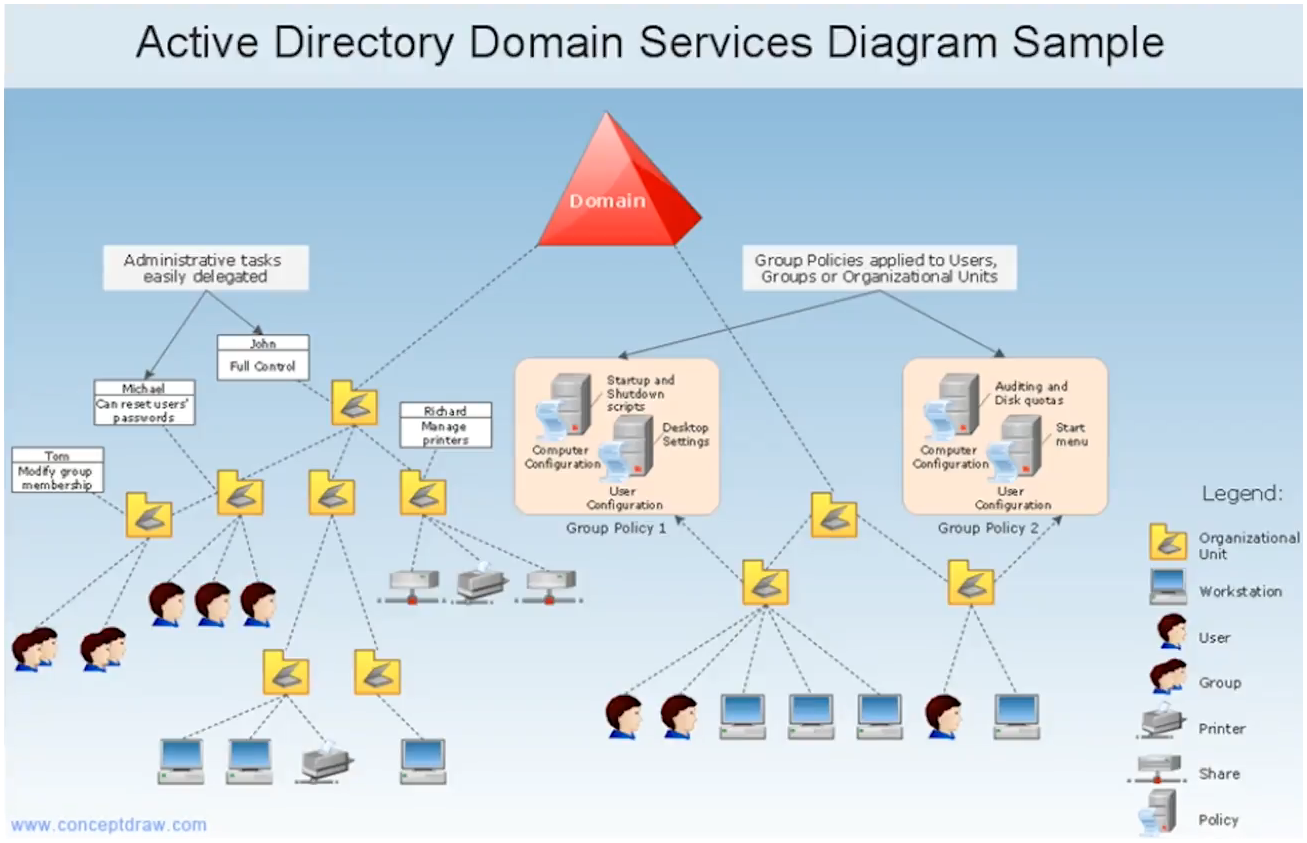
Active Directory is a core tool for identity and access control.
Attackers target it not because it’s weak, but because it’s so powerful.
That’s why we need it — and also why we must harden and monitor it continuously.