Where windows stores its password?
1. SAM database(Security Account Manager)
-
used for storing passwords locally in our local system
-
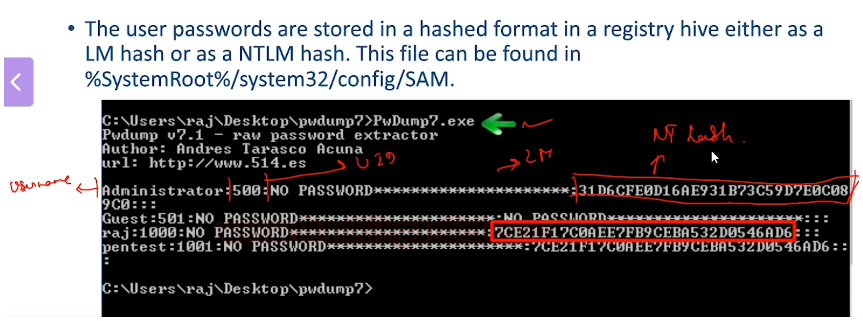
SAM is a database file in Microsoft Windows Operating System(OS) that contains the usernames and passwords in hashed format (passwords are never stored in plain text)
-
The primary purpose of the SAM is to make the system more secure and protect the system from data breach in case the system is stolen.
-
Path:
C:\Windows\System32\config\SAM- this means, SAM data is locally stored, hence used in the case of local logons, the user will be able to access the data which is stored in that profile.
- SAM cannot be directly accessed, there are some security measures, but we can break the security measures and and extract data from SAM (Ex- in the image below, we used PwDump7.exe to extract)
-
SAM is available in diff versions of Windows, including
- Windows XP
- Windows Vista
- Windows 7
- Windows 8.1
- Windows 10
- Windows 11
-
2. NTDS.dit
- password is stored in the Domain controller
NTDS stands for NT Directory Services
DIT stands for Directory Information Tree
- NTDS because the Active Directory was called NT Directory Services originally.
- The DIT part means Directory Information Tree — it's just a way to organize and store directory (AD) data like users, groups, and computers.
- It's the main database file of Active Directory.
- It uses a X.500-based structure, which is a standard way of organizing directory information.
- X.500 is like a standard rulebook for organizing and managing directory information (like users, groups, devices).
- It says how data should be arranged in a tree-like structure (like folders and files).
- Active Directory (which follows X.500 rules), data is stored in a tree format, with the domain at the top, and organizational units, users, and computers as branches and leaves.
Location of NTDS.dit
By default:
C:\Windows\NTDS\NTDS.dit
This file is only present on Domain Controllers, not on client machines or member servers.
What’s Inside NTDS.dit?
It uses a Jet Blue (Extensible Storage Engine - ESE) database format and includes:
- Schema Partition – definitions for all object types (users, computers, etc.)
- Configuration Partition – configuration info for AD forest
- Domain Partition – all domain-specific objects (users, groups, etc.)
- Application Partitions – optional partitions for storing custom data (e.g., DNS data)
Summary
When a machine is joined to an Active Directory domain, the SAM database still exists, but:
-
It only manages local accounts on that individual machine.
-
Domain accounts (users, groups, computers) are managed by Active Directory, which stores data in the NTDS.dit database on a Domain Controller.
Difference between the two
| SAM (Local) | Active Directory (NTDS.dit) |
|---|---|
| Manages local users & groups | Manages domain users, computers, groups |
| Limited to one machine | Centralized across the domain |
| NTLM authentication | Kerberos + NTLM |